For me, and I assume not a few of us, once Script Debugger ceases to work on the latest macOS (assuming we’re running it in “production”), our scripting days will come to a close, kicking and screaming. Can we just keep a running “sound off” as OS updates are rolled out to track/count this down?
How about using Apple’s Script Editor?
1 Like
I already see some issues on Tahoe, sadly. When switching to Script Debugger from another app after SD hasn’t been in use for some time, there’s a beachball that keeps SD unresponsive for half a minute or so.
SD 8.0.10, any version of Tahoe.
It’s not the end of the world but maybe a sign of further issues to come.
1 Like
Obviously, we’ll have to do this once we don’t have a choice. But you know just like all of us that compared to Script Debugger, Apple’s Script Editor is a shameful piece of junk.
No smart-assery intended, much less offense, and forgive me for belaboring the obvious, but…
In 2025, isn’t AppleScript itself is a “shameful piece of junk?” It’s been not quite a decade since Apple fired Sal Soghoian for caring about advanced users of macOS. No one but the usual short-term profit obsessed shareholders and dead-eyed corporate sharks though this was smart, but there if there’s a foreseeable future in which it changes, I hope someone will tell me how to get to it as soon as possible.
AppleScript is a zombie language we tolerate only because none of us can either fix, replace, or apparently, live without it. Give this unpleasant fact, Script Debugger’s days were always numbered. No one can be expected to invest heart, time, sweat, or resources in an IDE for a dead language.
AppleScript is the lover who lacks the integrity to dump you so long as you continue to pay for the Netflix subscription. Sadly, entropy is real, and no matter how great the love or disappointment, eventually one just has to move on, even when there’s nowhere to go.
P.S. “For the love of God, Montresor!”, please don’t utter the name “Shortcuts” in my presence. I’m deathly weary of listening to myself rant. 
The Script Debugger crashes more often than Apple’s genuine Script Editor, so I don’t use it unless I absolutely have to.
I have also written and used hundreds of AppleScripts to extend Script Editor, and I can call up highly functional Scripts from the context menu.
For example, my ebooks includes an appendix that includes an extended script that recognizes AppleScript syntax elements and replaces only the variable “tmpColor”. This is something that Script Debugger cannot do.

1 Like
Interesting… I’ve been using Script Debugger for years (and ASOC Explorer before that), and they have been rock solid.
For Script Editor, I’m mostly missing these two essential options:
-Code completion
-Apply color to method and handler names
I’m not offended but I am surprised!
To call AppleScript a “shameful piece of junk” seems completely disproportionate. It’s a limited and perhaps eccentric “glue” compared to “real” programming languages but, for me at least, its ability to get stuff done (my work with it has mostly involved Adobe InDesign and InCopy) for dozens and sometimes hundreds of users in busy production environments has been of huge value. I’m still only a moderately competent AppleScripter but without AppleScript’s low bar to entry I wouldn’t even be that.
You say that “Apple fired Sal Soghoian for caring about advanced users of macOS”. I don’t believe that’s true. I met Sal a couple of times including when he came to see the Mac setup on which I was working at the time. (Close to a thousand seats.) He is a very nice fellow but perhaps too nice to get industrial-strength automation tools the attention they needed inside the behemoth that Apple has become.
I certainly wish a more “professional” successor to AppleScript was a priority in the post-iPhone Apple. Until and unless that happens I’m clinging on here!
(I have seen Script Debugger crash very occasionally by the way, but I don’t think I’ve ever seen it lose any of my work when it has — not in many years at least. I never don’t have it running on my Mac and will cry bitter tears when it does finally stop working.)
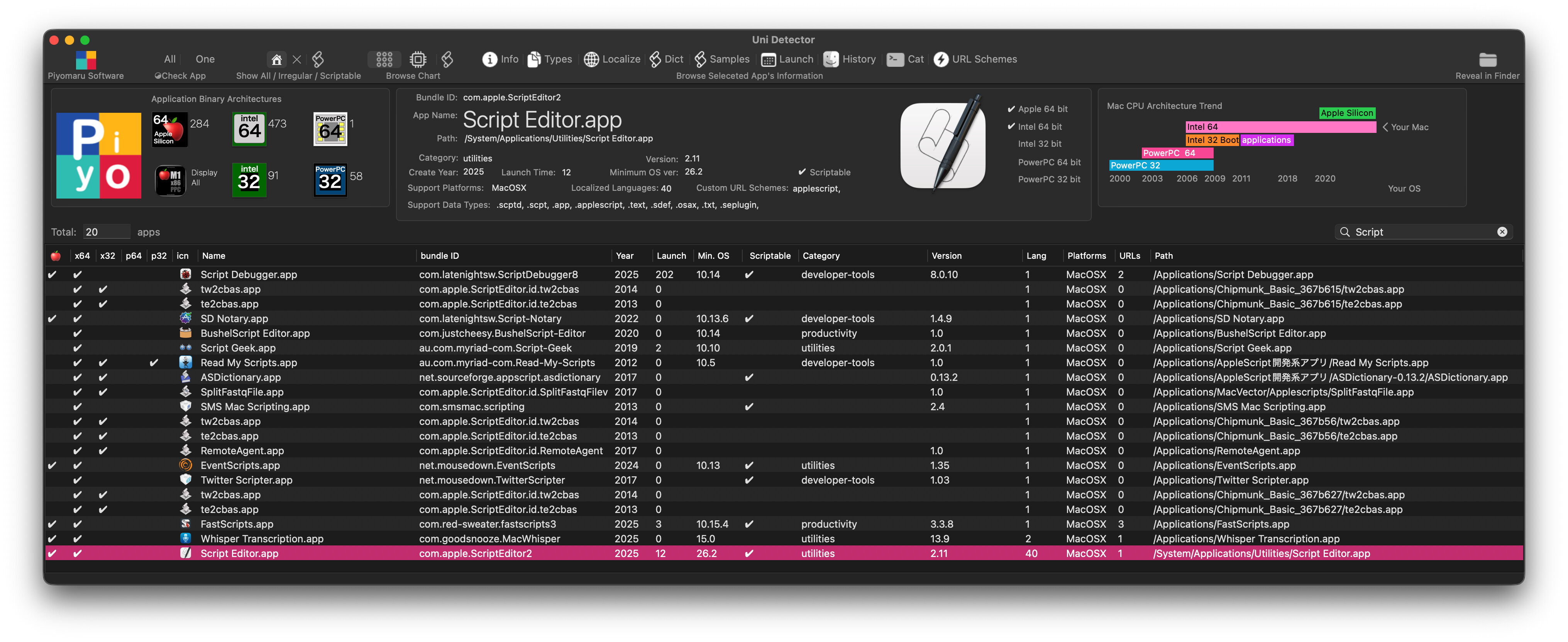
My Uni Detector app (written in AppleScript Mac App Store app) told me Script Debugger and Script Editor’s launch time.
Both tools launch during my Mac operation.
Script Debugger launch and crash 10 or more times frequently than Script Editor.
Some widely varied experiences out there for sure.
- I can count how many times Script Debugger has crashed on me in 30 years on one hand, to which one of you may reply “you weren’t holding it correctly”, or the Dale Earnhardt response “you weren’t trying hard enough”.
- Stepping through code is my #1 reason to mourn the loss - or did Apple add that feature to Script Editor, because I’ve had very few “needs” to even touch SE in the last 25 years…?
- I’m still using AS because I’m in the original “target demographic” - not a programmer, but an advanced “Power User” (can you say “QuarkXPress 3.31r5”?), I’ve been saving $$$$'s and days upon days of people’s time for the last 30 years with this tool, and won’t stop until Apple rips AppleScript out of the operating system.
Just for the record, SD 8.0.10 is working fine for me on Tahoe 26.2, no beachballing.
Here’s my experience with SD’s beachballing. I installed Tahoe on a bootable external drive, for testing. And, boy howdy, it was awful! Every step while debugging, for example, showed a beachball for 5–30 seconds. Painful!
Then I realized that putting Tahoe on a mechanical HD was foolish. So I re-installed it on an external SSD and the result is amazing. There’s virtually no SD beachballing at all. SD 8.0.10 looks great on macOS 8.1. (Am planning to go to 8.2 tonight.)
As has been mentioned, there is Apple’s Script Editor, though a crude replacement for Script Debugger.
I am using Sublime Text 4 with the optional AppleScript Extensions package. That with the Mac Classic color theme, and an AppleScript-specific settings file that opens an AppleScript file with that Mac Classic color theme.
The AppleScript Extensions package allows one to press ctrl+cmd+B to open a menu where one can compile to test the script syntax, run the script, or even build an application. Behind the scenes, it uses ossacript or osacompile. A result window opens at the bottom of the editor window to show any errors, or if none, the [Finished in 49ms] message. If I enter the following in the Terminal command line:
subl datetime.applescript
The code is opened in sublime text 4 and displayed in the Mac Classic colors. When I press the ctrl+cmd+B keystroke, one sees:
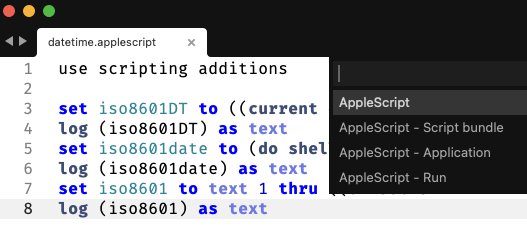
When I select AppleScript Run, the following is displayed at the bottom of the editor:
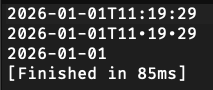
This is on Tahoe 26.2.
1 Like
AppleScript is not “dead” nor is it a “zombie language”. In fact, it’s one of Apple’s greatest success stories (along with Sal). Not only successful for Apple but also bringing many successes to individuals and businesses across the world. It allowed millions who don’t grok dot-notated syntaxes and other such languages to comandeer their machines in ways they understand and control. Also, if you have never tried to teach coding to laypeople, you have no idea the happiness of people when they see the fruits of their own scripts, no matter how simple. AppleScript is much easier to teach to the average person.
I have AppleScripted many different apps over all the years I’ve been on Macs, including doing it professionally for companies from single person startups up to a multi-billion dollar, multinational corporation. It is a far more capable language than you seem to understand. I have done many things with AppleScript people said couldn’t be done. It will be a terrible move if Apple decides to actually deprecate it someday, especially when they’ve never offered any remotely comparable replacement. (And I agree on Shortcuts… ugh! Automator (still kicking around even on Tahoe) is not awesome but still better than Shortcuts.)
PS: I’m talking about vanilla AppleScript too, not ASOC (which is very cool and has its place, but not something accessible to the average layperson wanting to script something).
PPS on topic: I haven’t seen any issues with SD on Tahoe. However, I have used Apple’s Script Editor as my primary IDE for almost all my scripting and it has been for all these years.
I “amen” all those points, and have since 1994. Notice I didn’t say the language is dead, I said the tool that empowers us to make highly productive use of that language, is on borrowed time. Face it, once Script Debugger is no longer usable - which is assuming the Macs we’re using are running actively patched OSes (corporations of any real size will insist that we do so), new development and troubleshooting will getting exponentially more difficult.
As I mentioned, I have used Script Editor as my primary IDE all this time. I fire up SD on occasion but it has never been my daily driver. I’d say I use it 5% of the time and Script Editor 95%.
Here is the AppleScript Extension site. It now no longer shows up as a package entity in the Sublime Text Package Install listing, as it did for me when I recently installed it on Tahoe 26.2.
From the package github location, the only means to install it now is from the Terminal with the git clone… approach which they provide at their site. I just did that on Sequoia v15.7.3 into Sublime Text 4200 and a subsequent Package Manager List packages shows AppleScript Extensions installed.
With the package installed, the Sublime Text 4 Tools menu has a Build With… (shift+cmd+B) entry that provides the options for AppleScript.
Good luck.
The reason for using ASOC is that development of GUI apps for Mac has stagnated overall, so we can no longer wait for an app to be released to access the functions we want to use within the OS, and because it is impossible to create apps for the Mac App Store without using Cocoa’s functions.
Without Cocoa functionality, we can’t call REST APIs or make judgments based on machine learning models from AppleScript.
This is a real pain in the modern environment.
Writing AppleScript without Cocoa functionality is extremely difficult these days. I hate the tedious process of sorting a list of hundreds of thousands of items.
Not being able to use address geocoding, which looks up latitude and longitude from an address and vice versa, would be a nightmare.
1 Like
Sal was fired because in 2016 Apple ran out of Steve Jobs impetus and saw its first flat year in revenue, so cleared out a load of accumulated deadweight that wasn’t performing in order to shore up margins. That Sal was included on this list was 100% his own doing.
If Sal Soghoian had actually cared about advanced users, he’d have worked with me, Matt Neuburg, and Jordan Hubbard in 2007 to put appscript into Mac OS X Leopard, extending Mac Automation to a hundred thousand Python and Ruby users. He’d have worked with me in 2014 to make JavaScript for Automation a competent alternative to AppleScript, extending Mac Automation to a million JavaScript users. And he’d have taken SwiftAutomation when I offered it freely the following year, securing the future of Mac Automation among Swift developers too.
Sal didn’t do any of these things. What he did do: shipped garbage products repeatedly and immediately abandoned them (and their few hapless users) to sink without trace. That third time I warned Sal he was destroying Mac Automation. A year later he was out, and the department eliminated.
Here’s the biggest suck: Apple has spent the last decade failing miserably to make its Siri AI useful. AppleScript may be a dying language but the Apple Event Object Model that underpins its scriptable apps is an absolute jewel—a powerful, advanced query-driven interface that Siri’s voice-directed query builder could’ve talked directly to. All it needed was advanced users—creative programmers who truly “got” how this technology worked—to connect the two together, make it work, and expand it into iOS.
As Apple’s Automation Product Manager for 20 years, Sal was gifted multiple astonishing opportunities to shape the future of user automation—not just for a million macOS users but a billion iOS users also. And he ruined every one, simply because he didn’t understand what he was doing and couldn’t stand for others who did.
1 Like