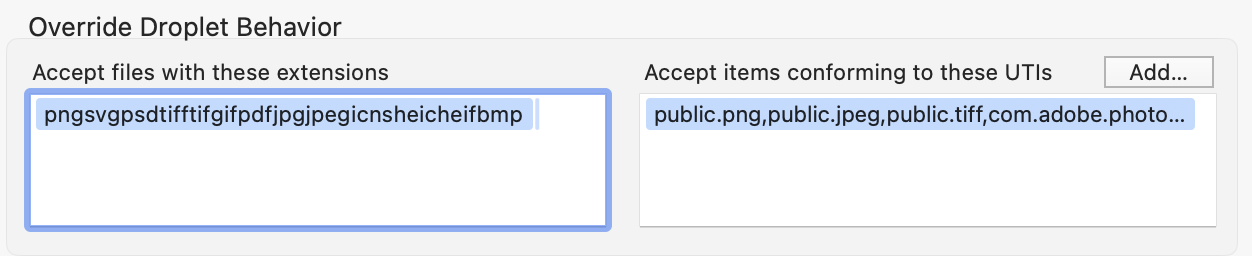
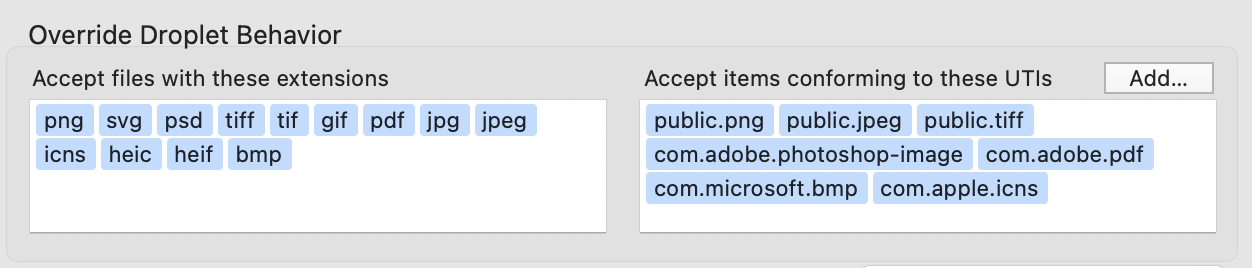
I’m running macOS 27 Golden Gate RC and tried to update one of my Enhanced Applets. I wondered why I can’t drop files into the droplet window anymore; an older version still works fine under macOS 27. So I looked into the Bundle & Export Settings and found this strange behavior options:
I can’t fix it in any way. The fields are merged again when you apply the changes or, at the latest, during compilation. Manually tinkering with Info.plist won’t help, because it invalidates the signature.
My current solution is to validate the file types in the appletFileIsAcceptable handler:
property allowedExtensions : {"png", "svg", "psd", "tiff", "tif", "gif", "pdf", "jpg", "jpeg", "icns", "heic", "heif", "bmp"}

on appletFileIsAcceptable(theFile)
	if folder of (info for theFile) is true then return false
	return name extension of (info for theFile) is in allowedExtensions
end appletFileIsAcceptable
We are setting the tokenizingCharacterSet property – to space, comma and period for extensions, and space and comma for UTIs. That sort of thing is what the property is exposed for, though.
Oh yeah of course. My question was actually directed to @Tekl. Like I mentioned, it was a shot in the dark. I’m not even sure where the discussed feature is - in Script Debugger or in a custom app created by OP - so I dropped this suggestion as a possible cause of the issue to investigate.
It’s the Build Settings for Enhanced Applets (Sh+Cmd+B) from Script Debugger. Currently, only Hazel came to my mind which uses such tokens. It works, but it has been updated this year. Maybe SD is too old.
My solution with the code is not perfect, btw. When I open some files with droplet, it sometimes hangs. So I removed the code and use a generic, single public.image UTI and pdf for extensions. I’m glad, that this fits my needs.
Hi. I’ve tested it with macOS 27.2 Beta and the problem is still there. I can enter something like “png,gif,jpg” and the window will separate those extensions like tags. But when I close and reopen the dialog, all three extensions are mashed together to one big tag.
Edit: I don’t need to close the dialog. I just have to press return so that the fields are mashed together.