Ed. They are now in General > Languages and Region:
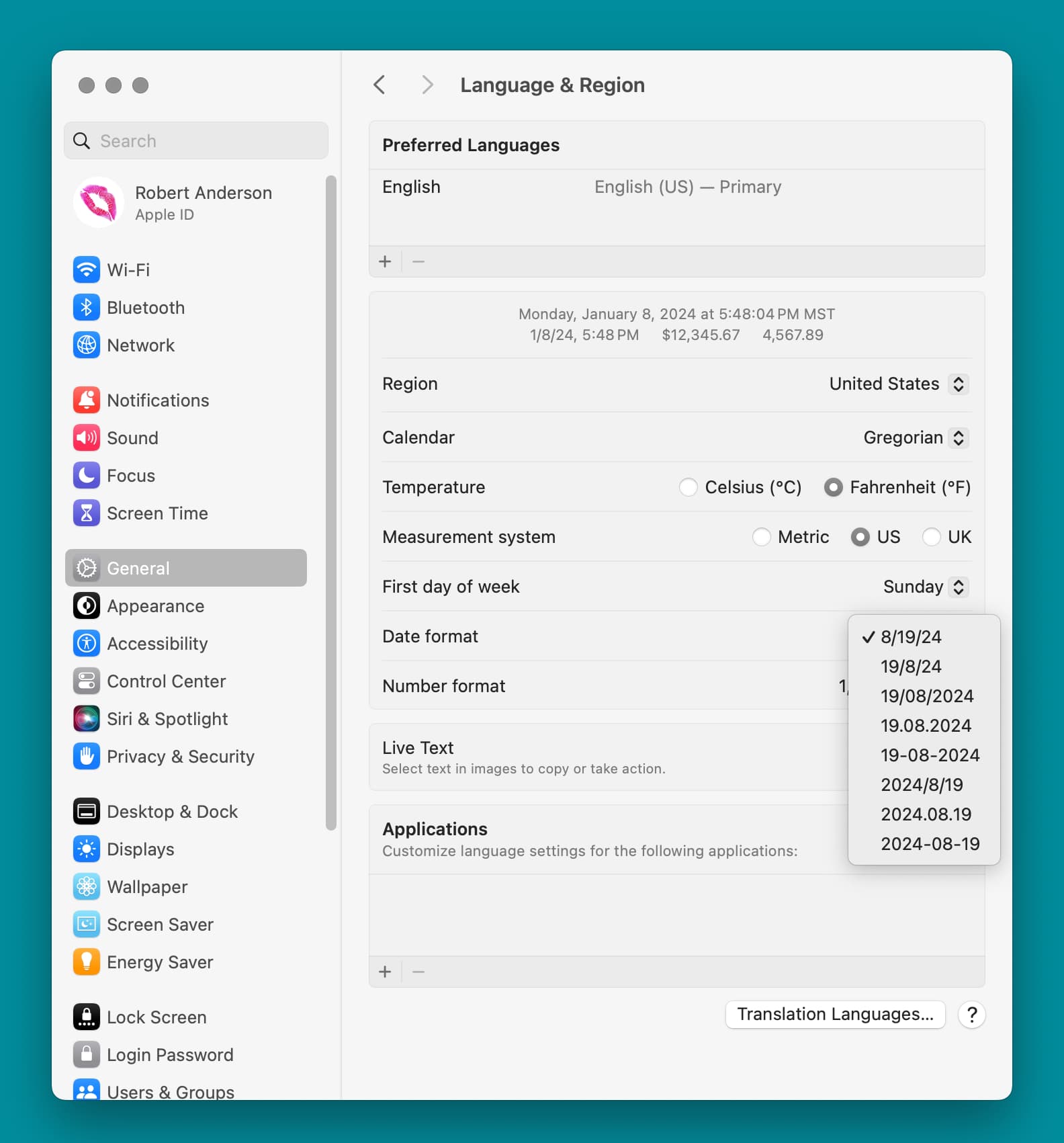
Thank you very much!
Although, that shows the Date string, but not the Time string, and that’s where the issue is.
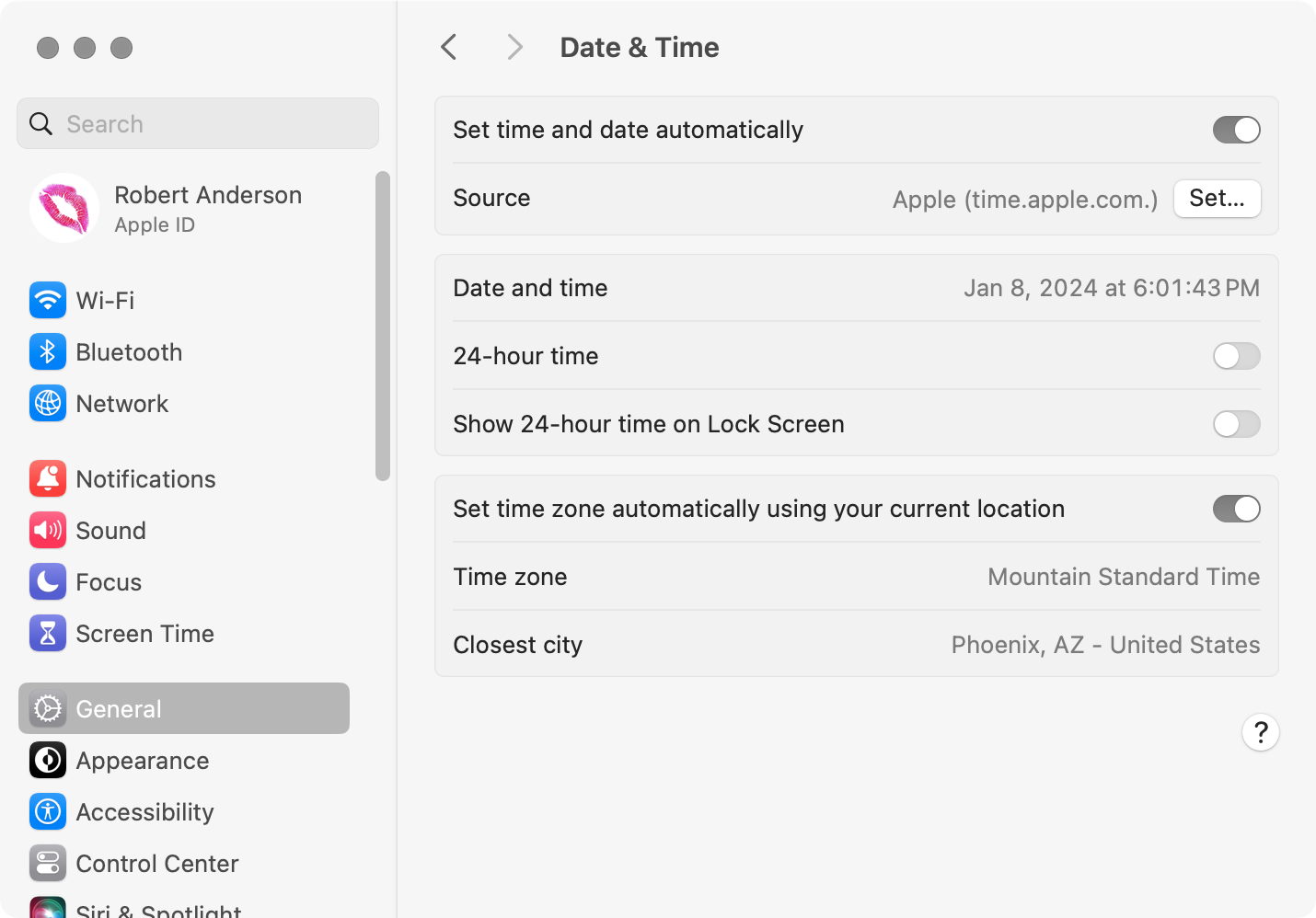
I couldn’t find anywhere they can be modified – it looks like we’ve lost that ability.
I’ve run into a related issue with parsing time strings under Sonoma. It appears that Apple is now using U+202F – NARROW NO-BREAK SPACE [NNBSP], instead of ASCII space between the seconds and AM/PM parts of time strings.
In the past, we could break time strings apart using space and colon as text item delimiters. Now we need to add NNBSP as a third delimiter.
Stan C.
2 Likes
Another good reason to use ASObjC to extract components, rather than trying to parse date strings.
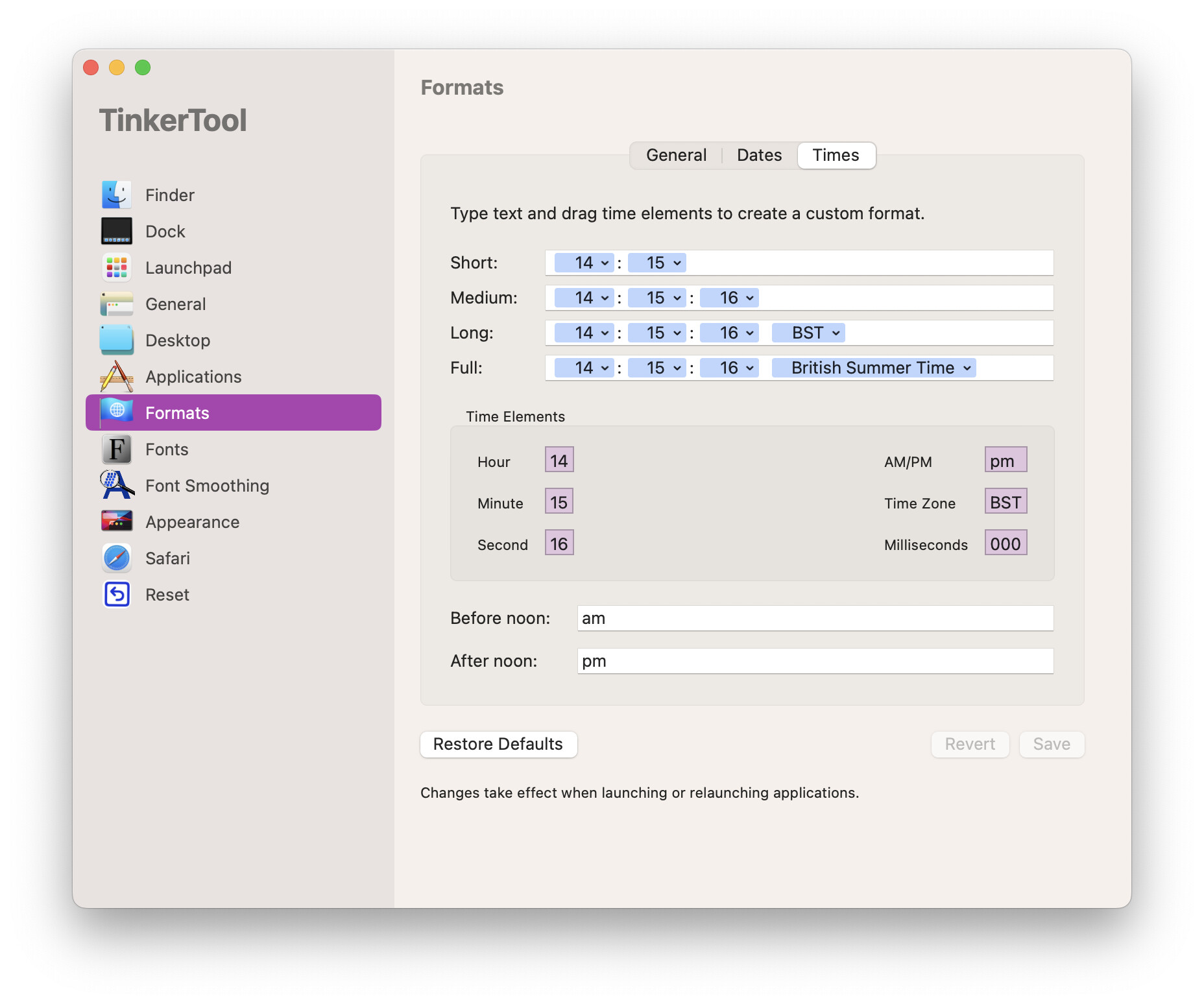
(I’m a bit late to this, but in case it’s still helpful…) Although Apple has removed the UI for customising the time string (and limits what’s allowed with the date string), the ability to customise is still there. I believe it can be achieved with the defaults command but the easiest method is to download the free TinkerTool utility.
2 Likes
Can you give us a an example of how this works?
I’ve got a bunch of handlers I need to update.
Note, that NNBSP in time strings is not recognized as a word delimiter in AppleScript.
The easiest way is to use a date formatter. For example:
use AppleScript version "2.4" -- Yosemite (10.10) or later
use framework "Foundation"
use scripting additions

set someDate to current date
set formatter to current application's NSDateFormatter's new()
formatter's setDateFormat:"hh:ss"
set theTime to (formatter's stringFromDate:someDate) as text
The various format strings are listed here:
https://unicode.org/reports/tr35/tr35-dates.html#Date_Format_Patterns
3 Likes
I am always working with dates and times, and, have very specific requirements as to how they are formatted. Specifically, the abbreviations for months and days and the representation of AM/PM, the use of noon and midnight.
Fixing this latest hiccup I found I have more than a dozen different handlers for getting date and time texts out of appleScript dates used in various scripts.
So, I’m took this opportunity to come up with a single handler to replace all of those. At some point I’ll put it a library and will give the lib a dictionary. But for now this will work nicely.
Thanks, Shane!
use AppleScript version "2.4" -- Yosemite (10.10) or later
use scripting additions
use framework "Foundation"
set aDate to current date
set time of aDate to 0 * hours
set aDate to aDate + 12 * days
set timeDateResults to {}
repeat 52 * 7 times
   set thisDateTimeRecord to my FormatDateTime(aDate)
   set the end of timeDateResults to frmtAbbDayDate of thisDateTimeRecord & " " & formattedTime of thisDateTimeRecord
   set aDate to aDate + 30 * minutes
   set aDate to aDate + 12 * days

end repeat
return timeDateResults
on FormatDateTime(someDate)
   set wkdStrings to {"Sun.", "Mon.", "Tues.", "Wed.", "Thur.", "Fri.", "Sat."}
   set mnthStrings to {"Jan.", "Feb.", "March", "April", "May", "June", "July", "Aug.", "Sept.", "Oct.", "Nov.", "Dec."}
   set dateTimeRecord to {frmtLongDayDate:"", frmtAbbDayDate:"", frmtShrtDt:"", frmtShortDate:"", slugDate:"", slugDateSort:"", frmtTime:"", formattedTime:"", w:"", ww:"", WWWW:"", m:"", mm:"", mmm:"", MMMM:"", DD:"", d:"", yyyy:"", yy:"", hh:"", h:"", min:"", mi:"", ampm:""}

   set formatter to current application's NSDateFormatter's new()
   set aPattern to "ee EEEE MM MMMM dd yy yyyy hh mm aaaaa"

   (formatter's setDateFormat:aPattern)

   set formattedDateTime to (formatter's stringFromDate:someDate) as text

   set {weekday2d, weekdayString, month2d, monthString, day2D, year2d, year4d, hour2d, minute2d, ampm} to words of formattedDateTime

   tell dateTimeRecord
      set its w to weekday2d as integer
      set its ww to item (weekday2d as integer) of wkdStrings
      set its WWWW to weekdayString

      set its m to month2d as integer
      set its mm to month2d
      set its mmm to item (month2d as integer) of mnthStrings
      set its MMMM to monthString

      set its d to day2D as integer
      set its DD to day2D

      set its yy to year2d
      set its yyyy to year4d

      set its h to hour2d as integer
      set its hh to hour2d

      set its mi to minute2d as integer
      set its min to minute2d

      set its ampm to ampm & ".m."

      set its frmtLongDayDate to (its WWWW & ", " & its MMMM & " " & (its d) as text) & ", " & its yyyy as text

      set its frmtAbbDayDate to (its ww & ", " & its mmm & " " & (its d) as text) & ", " & its yyyy as text

      set its frmtShrtDt to (its m as text) & "/" & (its d as text) & "/" & (its yy as text)
      set its frmtShortDate to its mm & "/" & its DD & "/" & its yyyy as text

      set its slugDateSort to (its yy as text) & "-" & its mm & "-" & its DD
      set its slugDate to its DD & "-" & its mm & "-" & (its yy as text)

      if its min is "00" then
         set its frmtTime to (its h as text) & " " & its ampm
      else
         set its frmtTime to (its h as text) & ":" & its min & " " & its ampm
      end if

      set midNoonTime to its frmtTime
      if midNoonTime is "12 a.m." then
         set midNoonTime to "midnight"
      else if midNoonTime is "12 p.m." then
         set midNoonTime to "noon"
      end if
      set its formattedTime to midNoonTime
   end tell

   return dateTimeRecord
end FormatDateTime
I wonder if you’re doing way too much work there. Could not something like this work:
on FormatDateTime(someDate)

	set formatter to current application's NSDateFormatter's new()
	set aPattern to "EEE., MM MMM. d, yyyy h:mm bbbbb"

	(formatter's setDateFormat:aPattern)

	set formattedDateTime to (formatter's stringFromDate:someDate) as text
	-- do midninght noon S&R here
	return formattedDateTime

end FormatDateTime
That would be too easy. If you look at the abbreviations used in my handler, we have very specific styles we have to meet.
We don’t abbreviate short month names (March, April, May, June, July). Also, for some reason we use “Sept.” instead of “Sep.”
We use Tues and Thur for Tuesday and Thursday abbreviations.
We use “a.m.” or “p.m.” rather than “AM” or “PM”.
Also, of times on the hour we don’t use the “:00”. We just say 7 a.m.
And we use “midnight” and “noon” to replace 12 am and 12 pm
Some of these specifications could be made in the local time and date setting, but some couldn’t, and we can’t set those from a script and I hate having to rely on something a user may change.
You can handle those by modifying the formatter (and pattern):
	set formatter to current application's NSDateFormatter's new()
	set aPattern to "EEE, MMM d, yyyy h:mm a"
	formatter's setShortWeekdaySymbols:{"Sun.", "Mon.", "Tues.", "Wed.", "Thurs.", "Fri.", "Sat."}
	formatter's setShortMonthSymbols:{"Jan.", "Feb.", "March", "April", "May", "June", "July", "Aug.", "Sept.", "Oct.", "Nov.", "Dec."}
	formatter's setAMSymbol:"a.m."
	formatter's setPMSymbol:"p.m."
You ca do them via S&R.
One thing: you’re creating a new date formatter for each string, which is inefficient. You’d be better to have two handlers: one to set up the date formatter, which you’d then pass to the second to use to create the strings.
Thanks, I’ll give that a try.
Search and Replace?
Yep:
	set formattedDateTime to (formatter's stringFromDate:someDate)
	set formattedDateTime to formattedDateTime's stringByReplacingOccurrencesOfString:" 12:00 a.m." withString:" midnight"
	set formattedDateTime to formattedDateTime's stringByReplacingOccurrencesOfString:" 12:00 p.m." withString:" noon"
	set formattedDateTime to formattedDateTime's stringByReplacingOccurrencesOfString:":00 " withString:" "
	return formattedDateTime as text
Can’t get this to work. I get an execution error:
"Friday Fri. April April 04 5 24 2024 12:00 a.m." doesn’t understand the “stringByReplacingOccurrencesOfString_withString_” message.
As far as I understand, you’ll need to convert formattedDateTime to NSString first using NSString's stringWithString:formattedDateTime (or don’t convert formattedDateTime to text before using stringByReplacingOccurrencesOfString…).
Thanks. Removing the text coersion fixed it.
OK, here’s a version that incorporates your suggestions. It may look like it could be further simplified but the idea here is to generate a single record that accounts for every use of date or time I have in various scripts.
This runs significantly faster than using the pure appleScript version I was using before.
Eventually I’ll save it as a script library and add a dictionary.
use AppleScript version "2.4" -- Yosemite (10.10) or later
use scripting additions
use framework "Foundation"
use framework "AppKit"

property formatter : {}
DateTimeFormatter()
set aDate to current date
set timeDateResults to {}
repeat 52 * 7 times
   set thisDateTimeRecord to my FormatDateTime(aDate)
   set the end of timeDateResults to longDayDate of thisDateTimeRecord & " " & tm of thisDateTimeRecord
   set minuteMult to random number from 1 to 60
   set dayMult to random number from 1 to 7
   set aDate to aDate + minuteMult * minutes
   set aDate to aDate + dayMult * days
end repeat

on DateTimeFormatter()
   set formatter to current application's NSDateFormatter's new()
   formatter's setShortWeekdaySymbols:{"Sun.", "Mon.", "Tues.", "Wed.", "Thurs.", "Fri.", "Sat."}
   formatter's setShortMonthSymbols:{"Jan.", "Feb.", "March", "April", "May", "June", "July", "Aug.", "Sept.", "Oct.", "Nov.", "Dec."}
   formatter's setAMSymbol:"a.m."
   formatter's setPMSymbol:"p.m."
end DateTimeFormatter
on FormatDateTime(someDate)
   set dateTimeRecord to {longDayDate:"", abbDayDate:"", shrtDt:"", shortDate:"", slugDate:"", slugDateSort:"", timeString:"", slugTime:"", wwww:"", ww:"", mmmm:"", mmm:"", mm:"", m:"", dd:"", d:"", yy:"", yyyy:"", tm:"", hh:"", h:"", min:"", mn:"", ampm:""}

   set aPattern to "EEEE   EEE   MMMM   MMM   MM   dd   yy   yyyy   h:mm a   mm   HH   H   a"

   (formatter's setDateFormat:aPattern)
   set formattedDateTime to (formatter's stringFromDate:someDate)

   set formattedDateTime to formattedDateTime's stringByReplacingOccurrencesOfString:"   12:00 a.m." withString:"   midnight"
   set formattedDateTime to formattedDateTime's stringByReplacingOccurrencesOfString:"   12:00 p.m." withString:"   noon"
   set formattedDateTime to formattedDateTime's stringByReplacingOccurrencesOfString:":00" withString:""

   set saveTID to AppleScript's text item delimiters
   set AppleScript's text item delimiters to {tab}
   set {wwww, ww, mmmm, mmm, mm, dd, yy, yyyy, tm, min, hh, h, ampm} to text items of (formattedDateTime as text)
   set AppleScript's text item delimiters to saveTID

   tell dateTimeRecord
      set its wwww to wwww
      set its ww to ww
      set its mmmm to mmmm
      set its mmm to mmm
      set its mm to mm
      set its m to mm as integer
      set its dd to dd
      set its d to dd as integer
      set its yy to yy
      set its yyyy to yyyy
      set its tm to tm
      set its hh to hh
      set its h to h as integer
      set its min to min
      set its mn to min as integer
      set its ampm to ampm

      set its longDayDate to (wwww & ", " & mmmm & " " & (its d) as text) & ", " & yyyy
      set its abbDayDate to (ww & ", " & mmm & " " & (its d) as text) & ", " & yyyy

      set its shrtDt to (its m as text) & "/" & (its d as text) & "/" & yy
      set its shortDate to mm & "/" & dd & "/" & yyyy

      set its slugDateSort to yy & "-" & mm & "-" & dd
      set its slugDate to dd & "-" & mm & "-" & yy
      set its slugTime to hh & "-" & mm
   end tell

   return dateTimeRecord
end FormatDateTime
1 Like